Choosing the best UV Printer Machine in 2026 requires more than comparing price tags. Print quality, curing stability, ink cost, maintenance, and operator training can shape your real return on investment.
Grand View Research estimates that the global UV printer market reached approximately USD 1.76 billion in 2023. Its report also projects a compound annual growth rate of about 10.3% from 2024 to 2030. Smithers’ digital print research points toward wider demand for short runs, customized products, and faster production cycles. These figures are useful, but market reports use different definitions. Their numbers should not be treated as perfectly comparable.
Industry consultant Frazer Chesterman has said, “Print is not dead; it is evolving.” That observation applies directly to UV printing. A modern flatbed machine can print rigid boards, acrylic panels, wood, glass, and coated metal. A roll-to-roll model may suit banners, films, and flexible media better. The wrong configuration can turn a promising investment into an expensive workshop decoration.
This guide examines leading UV Printer Machine options for 2026. It considers printhead technology, white-ink performance, varnish control, production speed, software support, and after-sales service. It also looks at practical details, such as nozzle checks before a morning shift and curing consistency across a 1.2-meter panel.
No machine fits every business.
Real-world testing still matters. Quotes, specifications, and projected savings should be verified with suppliers, sample prints, and existing users before purchase.
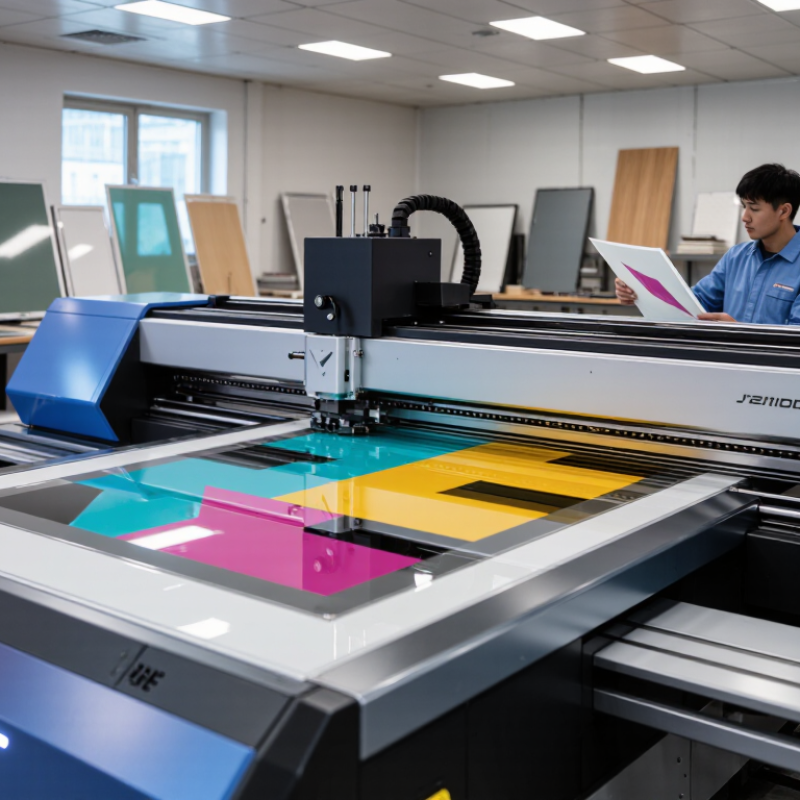
A UV printer is a digital printing machine that uses ultraviolet light to cure ink as it is deposited. Unlike solvent-based systems, the ink hardens almost immediately under UV lamps. The printhead places tiny drops of cyan, magenta, yellow, black, white, or clear ink on the surface. A lamp then passes over the area and fixes the image in place. This process allows printing on acrylic, glass, wood, metal, ceramic tiles, leather, and some flexible materials.
The workflow requires more than pressing a print button. An operator usually cleans the substrate, checks its thickness, adjusts printhead height, and runs a small color test. White ink can create a strong base on dark materials, while clear ink may add texture or gloss. Dust can cause missing dots. Poor height settings can create blurred edges. Small details matter.
UV printing is fast, but it is not effortless. Some surfaces need primer because ink adhesion can remain weak. Curved objects may require special fixtures, and heavy ink coverage can affect curing. A perfect first print is not guaranteed. Operators should inspect adhesion, color consistency, and lamp performance regularly. Ventilation, protective equipment, and correct waste handling also support safer production. The best machine depends on material range, daily volume, resolution needs, and maintenance discipline, not only advertised speed.
It should deliver consistent color on acrylic, wood, glass, metal, and coated surfaces. Even curing matters. White ink and varnish support dark materials, layered graphics, and raised effects. Precise droplets, alignment, and a stable vacuum table also help.
No. Advertised speeds often use draft settings and limited coverage. White ink, varnish, cleaning, and setup reduce real output. A slower printer may create less waste and fewer delays.
Request samples using your actual materials. Inspect fine text, gradients, white ink density, and varnish adhesion. Check acrylic edges, wood grain, and metal surfaces closely. Small tests reveal problems quickly.
Even UV LED curing helps prints dry properly. Uneven curing may leave small areas tacky. Curing performance should be tested across the whole print, especially with layered graphics.
Many models support acrylic, wood, glass, metal, coated paper, banners, and flexible media. Results depend on surface preparation. Dust, uneven boards, or weak adhesion can ruin a finished job.
A clear RIP workflow should manage color profiles, ink limits, nesting, and spot layers. Confusing settings can slow daily production. Easy calibration may matter more than laboratory resolution.
Include ink, printheads, electricity, cleaning supplies, software, maintenance, and technical support. Replacement parts also matter. A low purchase price can become expensive through downtime and rejected sheets.
Start with your products and busiest weekly orders. Phone cases need different capabilities from large signs. Check printable area, layer height, curing performance, and optional roll-to-roll handling.
Maintenance is essential. Keep records of nozzle checks, cleaning cycles, material settings, and failed prints. I once underestimated cleaning time. That mistake changed the expected production speed.
Keep temperature stable and dust low. Use suitable ventilation and follow local safety requirements. A disciplined routine helps, but no checklist removes every production risk.
Choosing the 2026 Best UV Printer Machine for your business starts with understanding how UV printing works. A UV printer uses ultraviolet light to cure specially formulated ink immediately after it is applied, allowing vibrant, durable printing on materials such as acrylic, glass, wood, metal, plastic, and coated products. Different printer types, including flatbed, roll-to-roll, and hybrid models, are suited to different applications, from customized products and signage to packaging, décor, and large-format graphics.
The best UV printer in 2026 should offer reliable print quality, accurate color reproduction, efficient curing, user-friendly operation, and compatibility with the materials your business commonly handles. When comparing models, consider resolution, printing speed, ink consumption, maintenance requirements, operating costs, and expected production volume. The right choice should balance performance and affordability while supporting future business growth. Before purchasing, evaluate your workspace, product range, budget, technical support needs, and return on investment to select a machine that delivers consistent results and practical long-term value.